My son-in-law launched a company this month and was looking for low cost email, Document Sharing and website solution and I discovered standard edition of Google Applications which is giving more than he asked for and only at the cost of a domain registration.
Friday, July 31, 2009

Thursday, July 23, 2009
Printing Mailing Labels using gLabels
When there are weddings you need to send large number of invitations. You need to build postal address database and then print mailing labels. I had prepared address database for my daughter's marriage in 2001 but lost the file due to loss of hard disk on my old desktop from which data could not be recovered.
Another marriage is planned in Nov 2009 and since advance period of rail reservations is 3 months formal letters of invitations are required to be sent by first week of Aug 09.
This time I have prepared the Database in Spreadsheet on Google Docs so that it does not get lost. I have shared the document with others so that addresses could be fed into it quickly.
I bought Mailing Labels from a Stationery shop and the page format is 210x306 mm which looks non-standard. The product is from Oddy and perhaps obsolete (meant for Dot-matrix Printers).
I tried to create the Labels in Open Office but it has selection for Brand of paper and Oddy was missing from the list and no Brand was close enough.
Then I searched for "Printing Labels on Ubuntu" and discovered gLabels and installed it.
gLabel also had many templates but I decided to create one for Oddy for the paper size I had. There is a Template Designer accessible through File Menu. I selected custom size of paper and entered the measured dimensions. Then I entered the dimensions of the Label, no of Labels on the paper (16), horizontal and vertical pitch etc. carefully and saved the template but it was not satisfactory. Then I opened the XML file of the template from ~/.glabels as text file and edited and saved it.
gLabel does not accept spreadsheet data, therefore, I saved it in CSV format and used it through "Merge Properties". For entering text on the label, I created the text objects and inserted the merge fields into them.
I could print the Mailing Labels perfectly on the non-standard stationery. Before printing I went into the printer set up and selected Custom paper size.
Another marriage is planned in Nov 2009 and since advance period of rail reservations is 3 months formal letters of invitations are required to be sent by first week of Aug 09.
This time I have prepared the Database in Spreadsheet on Google Docs so that it does not get lost. I have shared the document with others so that addresses could be fed into it quickly.
I bought Mailing Labels from a Stationery shop and the page format is 210x306 mm which looks non-standard. The product is from Oddy and perhaps obsolete (meant for Dot-matrix Printers).
I tried to create the Labels in Open Office but it has selection for Brand of paper and Oddy was missing from the list and no Brand was close enough.
Then I searched for "Printing Labels on Ubuntu" and discovered gLabels and installed it.
gLabel also had many templates but I decided to create one for Oddy for the paper size I had. There is a Template Designer accessible through File Menu. I selected custom size of paper and entered the measured dimensions. Then I entered the dimensions of the Label, no of Labels on the paper (16), horizontal and vertical pitch etc. carefully and saved the template but it was not satisfactory. Then I opened the XML file of the template from ~/.glabels as text file and edited and saved it.
gLabel does not accept spreadsheet data, therefore, I saved it in CSV format and used it through "Merge Properties". For entering text on the label, I created the text objects and inserted the merge fields into them.
I could print the Mailing Labels perfectly on the non-standard stationery. Before printing I went into the printer set up and selected Custom paper size.
Wednesday, June 17, 2009
Opera Unite provides webserver, chat room, file sharing right from your PC.
Opera Unite was launched on 16th June 09 and I decided to give it a try on first day. When I clicked on the download link on Opera Unite page it was nothing but version 10.00 Beta of Opera browser. I downloaded the .deb package and installed on Ubuntu Jaunty Jaackalope.
When I opened the browser there was Unite icon on side panel. I could use myopera userid and password to setup the system on my PC. Immediately I could start the chatroom on my PC and send the link to my friends and chat with them.
I had developed some content regarding my experience on steam Turbines using Tiddlywiki in 2007. I could immediately setup website on my PC using that content.
For sharing photos and files I don't need to upload them anywhere. My friends could download directly from my PC.
All these things have become so easy for common user.
Wednesday, June 03, 2009
Uzbl the new usable browser on Ubuntu 9.04 Jaunty Jackalope
Uzbl is a new Webkit based browser with minimal graphical interphase. For opening a URL you have to type 'o URL' and it opens. See the screenshot below:
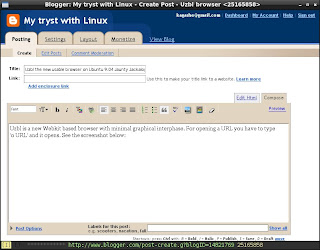

For adding a bookmark you have to type 'B'. For loading a bookmark you have to type 'u' and for loading a URL from history you have to type 'U'.
Actually o, B, u, U etc are keybindings defined in the config file and B, u and U also call the required scripts.
Tabbed browsing is not available but you can open any number of windows for different URLs.
This browser is being developed on Archlinux and easily installable from AUR. The bookmarks and history use the utility dmenu which has been patched for displaying the URLs vertically and available as dmenu-vertical in AUR.
After installation you can start the browser with 'uzbl' command but you get a blank browser window which does nothing since there is no default configuration. You need to create 'uzbl' folder in ~/.config and copy the following two files in it:
cp /usr/share/uzbl/examples/configs/sampleconfig ~/.config/uzbl/configcp /usr/share/uzbl/examples/configs/cookies ~/.config/uzbl/
For bookmarks you need to create 'uzbl' folder in ~/.local/share and copy the file:
cp /usr/share/uzbl/examples/data/bookmarks ~/.local/share/uzbl/
and create an empty session file:
cd ~/.local/share/uzbltouch session
You can also create a launcher uzbl.desktop:
[Desktop Entry]Encoding=UTF-8Name=UzblGenericName=uzblExec=/usr/bin/uzbl %uTerminal=falseType=ApplicationCategories=Application;Network;Icon=applications-internet
All the above settings are required even on Archlinux on which it is being developed since the developer is trying to just give a browser with all other things managed from scripts outside the browser, although, thy are giving 'example scripts' and the settings given above configure these example scripts to work in conjunction with the browser.
Now let us come to installation of uzbl on Ubuntu 9.04 Jaunty Jackalope.
For installing the recent version of Webkit Library add the following sources to /etc/apt/sources.list
deb http://ppa.launchpad.net/webkit-team/ppa/ubuntu intrepid maindeb-src http://ppa.launchpad.net/webkit-team/ppa/ubuntu intrepid main
to import keys
sudo apt-key adv --recv-keys --keyserver keyserver.ubuntu.com 0x991e6cf92d9a3c5b
and to install
sudo apt-get updatesudo apt-get install git git-core libwebkit-dev
to compile and install uzbl
git clone git://github.com/Dieterbe/uzbl.gitcd uzblmakesudo make install
After installation on Ubuntu you need to create uzbl directory in ~/.config and ~/.local/share and copy/create the files as stated above.
In addition, Ubuntu does not have $XDG_DATA_HOME set to ~/.local/share by default and dmenu-vertical is not available in Debian/Ubuntu repositories. These things are required by the example scripts.
There are various ways to set the environment variable $XDG_DATA_HOME but I simply decided to put the following line in the load_url_from_bookmarks and insert_bookmark scripts for the time being.
XDG_DATA_HOME=~/.local/share
I have downloaded dmenu-4.0 sources from:
wget http://code.suckless.org/dl/tools/dmenu-4.0.tar.gz
and the required patch from:
wget http://evaryont.me/dmenu-vertical-history.patch
and compiled dmenu-vertical:
tar -xvzf dmenu-4.0.tar.gzcd dmenu-4.0patch -p1 < ~/path-to/dmenu-vertical-history.patchmakesudo checkinstall
I used checkinstall to make .deb package of dmenu-vetical.
Monday, June 01, 2009
VOIP to Gtalk, YM, MSN using Gizmo.
I have setup Gizmo on Ubuntu and called couple of friends (Windows users) on their Gtalk and Yahoo Messenger and had voice chat today and surprised them.
Gizmo has not updated its Linux version since Nov 2007 and there is lot of criticism by Linux users on its forum. I had to use OSS to make the audio work.
Once setup and audio checked through free sip call to Echo Test I could easily import the Gtalk and YM buddies and could have text chat with online buddies but voice chat did not work. This was happening because they were setup as user_id@xmpp.chat.gizmoproject.com (Gtalk) user_id@yahoo.chat.gizmoproject.com
Then I added one contact as user_id@gmail.com and called him and had successful voice chat.
Gizmo has not updated its Linux version since Nov 2007 and there is lot of criticism by Linux users on its forum. I had to use OSS to make the audio work.
Once setup and audio checked through free sip call to Echo Test I could easily import the Gtalk and YM buddies and could have text chat with online buddies but voice chat did not work. This was happening because they were setup as user_id@xmpp.chat.gizmoproject.com (Gtalk) user_id@yahoo.chat.gizmoproject.com
Then I added one contact as user_id@gmail.com and called him and had successful voice chat.
Friday, May 29, 2009
Booting sidux from iso with persistent
I wanted to try sidux since long time. I downloaded the KDE lite version and searched on Google for 'sidux boot from iso' and got the page Booting with "fromiso" of sidux manual.
I created sidux folder at the root of an ext3 partition and copied the iso, vmlinuz and initd.img as per instructions and created following entry in /boot/grub/menu.lst
title sidux 32bit from ISO
kernel (hd0,X)/sidux/vmlinuz boot=fll quiet vga=791 fromiso=/sidux/sidux.iso persist
initrd (hd0,X)/sidux/initrd.img
After booting into sidux KDE 3.5.10 desktop I configured static IP through Ceni. Then I added noxorgconf and nonetwork boot parameters so that sidux does not create xorg.conf and reconfigures the network on reboot.
Since I don't like browsing with Konqueror I installed Iceweasel.
After reboot I found my static IP configuration intact and Iceweasel available.
The persist boot parameter creates folder fll at the root of same partition and uses the remaining space on the partition.
I created sidux folder at the root of an ext3 partition and copied the iso, vmlinuz and initd.img as per instructions and created following entry in /boot/grub/menu.lst
title sidux 32bit from ISO
kernel (hd0,X)/sidux/vmlinuz boot=fll quiet vga=791 fromiso=/sidux/sidux.iso persist
initrd (hd0,X)/sidux/initrd.img
After booting into sidux KDE 3.5.10 desktop I configured static IP through Ceni. Then I added noxorgconf and nonetwork boot parameters so that sidux does not create xorg.conf and reconfigures the network on reboot.
Since I don't like browsing with Konqueror I installed Iceweasel.
After reboot I found my static IP configuration intact and Iceweasel available.
The persist boot parameter creates folder fll at the root of same partition and uses the remaining space on the partition.
Wednesday, May 27, 2009
Installation of Archlinux from archiso-live-2009-05-24.iso
I had earlier installed Archlinux after downloading Core installer and following Beginners Guide on ArchWiki.
After reading about Archlinux Live CD archiso-live developed by godane on latest issue of Distrowatch Weekly I decided to give it a try and also use the installer.
I was very much impressed with the Live CD with Xfce as default and choice of LXDE, e17, gnome, openbox-session, Fluxbox by pressing F1 key at Slim Login Manager. The normal user login is arch/arch and root login is root/ArchLinux
The choice of applications is also good:
Blender, Comix, GIMP, GPICViewer, Rawstudio, mtPaint in Graphics category
Arista, Asunder, Audacious, Audacity, Avidemux, Elisa, Hydrogen, VLC in Multimedia category
Abiword, Gnumeric, HomeBank in Office category.
I decided to give the installer a try. Initially, the installer produced some errors after partitioning stage while copying files. I googled for the errors and decided to logout and login as root.
The installer worked this time and copied all the files successfully and failed at Bootloader stage (which I did not want to use anyway).
I found the installation in order except /etc/fstab (which was meant for Live CD) and some tweaks needed in /etc/rc.conf file DAEMONS line. I used the Beginners Guide to build /etc/fstab and also corrected the DAEMONS line.
I made an entry in present /boot/grub/menu.lst as suggested in Beginners Guide and I could boot into the installed Archlinux.
I found that the installer did not delete the Live CD user "arch", therefore, I logged in as arch password arch and everything is working fine.
I updated the system through pacman and found upgrades to clamav, docbook, pidgin, xchm and openvpn which I applied.
After reading about Archlinux Live CD archiso-live developed by godane on latest issue of Distrowatch Weekly I decided to give it a try and also use the installer.
I was very much impressed with the Live CD with Xfce as default and choice of LXDE, e17, gnome, openbox-session, Fluxbox by pressing F1 key at Slim Login Manager. The normal user login is arch/arch and root login is root/ArchLinux
The choice of applications is also good:
Blender, Comix, GIMP, GPICViewer, Rawstudio, mtPaint in Graphics category
Arista, Asunder, Audacious, Audacity, Avidemux, Elisa, Hydrogen, VLC in Multimedia category
Abiword, Gnumeric, HomeBank in Office category.
I decided to give the installer a try. Initially, the installer produced some errors after partitioning stage while copying files. I googled for the errors and decided to logout and login as root.
The installer worked this time and copied all the files successfully and failed at Bootloader stage (which I did not want to use anyway).
I found the installation in order except /etc/fstab (which was meant for Live CD) and some tweaks needed in /etc/rc.conf file DAEMONS line. I used the Beginners Guide to build /etc/fstab and also corrected the DAEMONS line.
I made an entry in present /boot/grub/menu.lst as suggested in Beginners Guide and I could boot into the installed Archlinux.
I found that the installer did not delete the Live CD user "arch", therefore, I logged in as arch password arch and everything is working fine.
I updated the system through pacman and found upgrades to clamav, docbook, pidgin, xchm and openvpn which I applied.
Wednesday, May 13, 2009
Ulx 9.04 Ubuntu based LXDE Live CD with all applications.
Today I am putting new iso of Ulx 9.04 on Linuxtracker.org which has Ubuntu 9.04 minus Gnome (replaced by LXDE), gnome-panel (replaced by lxpanel), Nautilus (replaced by PCManFM), gnome-terminal (replaced by LXTermina), gedit (replaced by Leafpad) but all other applications on LXDE Desktop. I have removed things which refer to Ubuntu like usplash (replaced by LXDE splashy), Ubuntu Docs, Ubuntu themes and wallpapers, Ubufox etc, GDM Ubuntu Themes. COMPIZ is also removed (replaced by Openbox).
It has gnome-games, Brasero, Movie Player (xine based), Rhythmbox, Pulse-audio, F-spot, GIMP, GPICViewer, XSane, Network Manager, Add/Remove, Computer Janitor, Language Support, Network Tools, Synaptic, System Monitor, Update Manager, Ekiga, Evolution, Firefox, Pidgin, Transmission, Open Office (minus Dictionery, language support). In short everything Ubuntu 9.04 has.
Some people may say it is as heavy as Ubuntu itself, may be. I have not tried to make it lighter by removing applications but I am sure the distrolet is lighter than Xubuntu.
In addition, I have written a small utility "mykeyboard" which helps in adding a Keyboard Layout to the default US Layout and added fbxkb to toggle.
Please download from torrent, seed it for some time, try it and post your comments here.
It has gnome-games, Brasero, Movie Player (xine based), Rhythmbox, Pulse-audio, F-spot, GIMP, GPICViewer, XSane, Network Manager, Add/Remove, Computer Janitor, Language Support, Network Tools, Synaptic, System Monitor, Update Manager, Ekiga, Evolution, Firefox, Pidgin, Transmission, Open Office (minus Dictionery, language support). In short everything Ubuntu 9.04 has.
Some people may say it is as heavy as Ubuntu itself, may be. I have not tried to make it lighter by removing applications but I am sure the distrolet is lighter than Xubuntu.
In addition, I have written a small utility "mykeyboard" which helps in adding a Keyboard Layout to the default US Layout and added fbxkb to toggle.
Please download from torrent, seed it for some time, try it and post your comments here.
Sunday, May 03, 2009
Ulx -- Ubuntu 9.04 distrolet with LXDE.
Today I made Ubuntu 9.04 LXDE Live CD and uploaded the iso on LinuxTracker. This is an experimental effort to get user feedback. At present it has Firefox 3.0.10 OpenOffice 3.0.1 gnome-games Leafpad only.
I am going to add multimedia applications and upload another iso image shortly.
Users are requested to write their feedback about Ulx 9.04 under comments on this blog post.
I am going to add multimedia applications and upload another iso image shortly.
Users are requested to write their feedback about Ulx 9.04 under comments on this blog post.
Sunday, April 12, 2009
xserver crash on restart taught me optimised use of memory.
I have a machine which originally arrived with 128 MB RAM and Linux Distributions with 2.4 series kernels (Mandrakelinux 9.1) worked well with this memory. Even Ubuntu 5.04 with 2.6 series kernel worked vey well.
Subsequently I added 256 MB RAM to the machine making it 384 MB to use Ubuntu 6.06 Dapper Drake properly.
I soon learnt to use lightweight Window Managers to have good speed with later versions of Ubuntu and also tried Debian and Arch Linux to further optimise thye memory usage.
The video setting in the BIOS was on "Auto" and 72 MB RAM was getting allocated towards the video leaving 312 MB for the OS.
Although Ubuntu says that its Live CD works with 256 MB RAM it is very slow and even 312 MB is less for effective use.
Recently I downloaded Ubuntu 9.04 Beta Live CD and in order to use it effectively changed the video setting in the BIOS to minimum (8 MB). The memory available for the Live CD was 360 MB (instead of 312 MB) and it worked very well.
Subsequently I forgot to restore the BIOS setting and continued using Linuxes installed on the hard disk (Ubuntu Hardy, Archlinux and antiX). They were working very well till I decided to change the Window Manager on Ubuntu Hardy and logged out of GDM to change session. To my surprise, the xserver crashed. I checked restart of xserver on Archlinux and antiX and it crashed on those distributions as well.
I googled for "xserver crash on restart" and read many bug reports and tried some remedies. Ultimetly I discovered the BIOS video setting and changed it to "Auto" once again.
Then I remembered that I had tested "logout" on Ubuntu 9.04 Beta Live CD and xserver did not crash.
I changed the BIOS video seiing to 16 MB and found that Archlinux (with xserver 1.5) did not crash on restart but Ubuntu Hardy Heron (which has xserver 1.4) required 32 MB setting in the BIOS.
Today I upgraded to xserver 1.6.0 on Archlinux and it is not crashing on restart with minimum (8 MB) video setting in the BIOS (like Ubuntu 9.04 Beta). With this setting the available memory for the OS has jumped from 312 MB to 367 MB.
Subsequently I added 256 MB RAM to the machine making it 384 MB to use Ubuntu 6.06 Dapper Drake properly.
I soon learnt to use lightweight Window Managers to have good speed with later versions of Ubuntu and also tried Debian and Arch Linux to further optimise thye memory usage.
The video setting in the BIOS was on "Auto" and 72 MB RAM was getting allocated towards the video leaving 312 MB for the OS.
Although Ubuntu says that its Live CD works with 256 MB RAM it is very slow and even 312 MB is less for effective use.
Recently I downloaded Ubuntu 9.04 Beta Live CD and in order to use it effectively changed the video setting in the BIOS to minimum (8 MB). The memory available for the Live CD was 360 MB (instead of 312 MB) and it worked very well.
Subsequently I forgot to restore the BIOS setting and continued using Linuxes installed on the hard disk (Ubuntu Hardy, Archlinux and antiX). They were working very well till I decided to change the Window Manager on Ubuntu Hardy and logged out of GDM to change session. To my surprise, the xserver crashed. I checked restart of xserver on Archlinux and antiX and it crashed on those distributions as well.
I googled for "xserver crash on restart" and read many bug reports and tried some remedies. Ultimetly I discovered the BIOS video setting and changed it to "Auto" once again.
Then I remembered that I had tested "logout" on Ubuntu 9.04 Beta Live CD and xserver did not crash.
I changed the BIOS video seiing to 16 MB and found that Archlinux (with xserver 1.5) did not crash on restart but Ubuntu Hardy Heron (which has xserver 1.4) required 32 MB setting in the BIOS.
Today I upgraded to xserver 1.6.0 on Archlinux and it is not crashing on restart with minimum (8 MB) video setting in the BIOS (like Ubuntu 9.04 Beta). With this setting the available memory for the OS has jumped from 312 MB to 367 MB.
Sunday, March 22, 2009
Debian Live LXDE persistent mode
I was very happy that Debian Lenny had Live LXDE Desktop CD. I had tried it briefly earlier. Today I decided to use the persistent mode i.e. changes saved in live-rw file and used on reboot.
As always I copied the contents of Debian Live LXDE iso to a 1 GB partition and edited /boot/grub/menu.lst to make following entries:
boot=live union=aufs This is copied from live.cfg file in isolinux directory
ip=frommedia This tells the system to read configuration from /etc/network/interfaces saved from earlier boots.
persistent This tells the system to look for live-rw home-rw partitions or files on the hard disk
noprompt This tells the system not to wait for removing Live CD on shutdown/restart
For persistent media I created live-rw on one partition (mounted at /media/disk) as follows:
All my personal settings are available, although, I did not create separate home-rw because live-rw includes changes to /home/user
As always I copied the contents of Debian Live LXDE iso to a 1 GB partition and edited /boot/grub/menu.lst to make following entries:
title Debian Live LXDEExplanation of boot parameters:
root (hd0,7)
kernel /live/vmlinuz1 boot=live union=aufs ip=frommedia swapon timezone=Asia/Kolkata persistent noprompt
initrd /live/initrd1.img
boot=live union=aufs This is copied from live.cfg file in isolinux directory
ip=frommedia This tells the system to read configuration from /etc/network/interfaces saved from earlier boots.
persistent This tells the system to look for live-rw home-rw partitions or files on the hard disk
noprompt This tells the system not to wait for removing Live CD on shutdown/restart
For persistent media I created live-rw on one partition (mounted at /media/disk) as follows:
$ dd if=/dev/null of=live-rw bs=512M seek=1Just to check that persistent includes the installed .debs I installed ttf-indic-fonts:
$ /sbin/mkfs.ext2 -F live-rw
$ sudo mv live-rw /media/disk
$ sudo apt-get install ttf-devanagari-fontsand the fonts are available on reboot.
All my personal settings are available, although, I did not create separate home-rw because live-rw includes changes to /home/user
Wednesday, March 11, 2009
Couple of steps on Zenwalk 6.0
Finally I have made Zenwalk 6.0 usable to my liking.
Setting static IP through Ethernet
Remove Wicd from Startup services:
Set up through netconfig (Just enter the required information):
Gmail Display problem
This is how Slackware site looked on Iceweasel on Zenwalk 6.0.
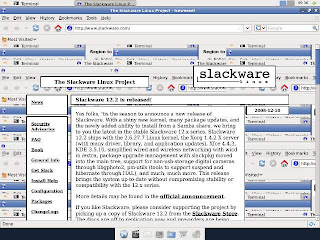
Similar problem was happening in Gmail. After reading on Zenwalk Forum I added the following lines in Device section of xorg.conf and it worked.
Setting static IP through Ethernet
Remove Wicd from Startup services:
Start Control_Panel (zenpanel}Reboot.
Click on Startup_Services
Uncheck Wicd
Click OK.
Click on Session_and_Startup in XFCE Settings Manager.
Click on Application_Autostart
Uncheck on Wicd.
Close
Set up through netconfig (Just enter the required information):
$ suRestart network (if you know how) or reboot.
Password:
# netconfig
Gmail Display problem
This is how Slackware site looked on Iceweasel on Zenwalk 6.0.

Similar problem was happening in Gmail. After reading on Zenwalk Forum I added the following lines in Device section of xorg.conf and it worked.
Option "AccelMethod" "XAA"
Option "XaaNoOffscreenPixmaps" "on"
Tuesday, March 10, 2009
Zenwalk 6.0
I decided to try the new Zenwalk 6.0. As usual I copied the contents of the iso to a partition and found nice article on Zenwalk Wiki. Accordingly I edited the existing /boot/grub/menu.lst:
After choosing the timezone the clock did not indicate my time. I discovered that Zenwalk was assuming that the hardware clock was set to localtime (which is actually UTC). After struggling a little I found the file /etc/hardwareclock and changed the word 'localtime' to 'UTC' and it worked.
I also installed ttf-indic fonts and flash-plugin using Netpkg.
Zenwalk 6.0 has XFCE 4.6 which I had briefly used on Arch Linux the day it was released and now trying it on Zenwalk.
title Zenwalk 6.0 installAs per instructions I selected "Exit setup" and got root shell where I mounted the extracted iso:
root (hd0,X)
kernel /kernels/ata/bzImage
initrd /isolinux/initrd.img
cd /and started the installation. When it asked for source selection I selected "Install from a pre-mounted directory" and when asked for the directory where the installation files are:
mkdir zeniso
mount /dev/sda(X+1) /zeniso
setup
/zenisoand continued the install. I did not install the bootloader and edited the /boot/grub/menu.lst once again to make an entry for Zenwalk:
title Zenwalk 6.0 (on /dev/hda6)Next step was to connect to internet on newly installed Zenwalk 6.0 but I had to struggle because Wicd 1.5.9 does not detect the wired ethernet connections properly. I had to setup as follows:
root (hd0,5)
kernel /boot/vmlinuz-2.6.28.7 root=/dev/sda6 ro
initrd /boot/initrd.splash
$ suI am yet to find out a way to save the above configuration.
Password:
# ifconfig eth0 down
# ifconfig eth1 192.168.1.3 netmask 255.255.255.0 up
# route add default gw 192.168.1.1
# exit
After choosing the timezone the clock did not indicate my time. I discovered that Zenwalk was assuming that the hardware clock was set to localtime (which is actually UTC). After struggling a little I found the file /etc/hardwareclock and changed the word 'localtime' to 'UTC' and it worked.
I also installed ttf-indic fonts and flash-plugin using Netpkg.
Zenwalk 6.0 has XFCE 4.6 which I had briefly used on Arch Linux the day it was released and now trying it on Zenwalk.
Tuesday, February 17, 2009
I am going to love antiX
I tested two Live CDs today. The first one was Debian LXDE Live downloaded from cdimage.debian.org/cdimage/release/current-live/i386/iso-cd/ It booted into nice LXDE Desktop with GIMP and OO apart from usual LXDE software. But there was no Network Manager and since my present router is not connected to NIC I had to manually configure the USB router by editing /etc/network/interfaces and /etc/resolv.conf But it is a good Live CD for machines having as low as 64 MB RAM. The Live CD does not have an installer and you can only have frugal type of install on hard disk.
The next Live CD was antiX-M8 'Intifada!' with IceWM as default Window Manager but believe me no distribution has such lovely IceWM fully configured:

I had Debian Lenny installed on one partition since Sep 08 which was not updated and the updates were huge. I decided to replace Debian Lenny with antiX since it is based on Debian Lenny with 2.6.27 Kernel.
Flash MPEG everything just works out of the box.
I am going to love antiX.
The next Live CD was antiX-M8 'Intifada!' with IceWM as default Window Manager but believe me no distribution has such lovely IceWM fully configured:

I had Debian Lenny installed on one partition since Sep 08 which was not updated and the updates were huge. I decided to replace Debian Lenny with antiX since it is based on Debian Lenny with 2.6.27 Kernel.
Flash MPEG everything just works out of the box.
I am going to love antiX.
Wednesday, February 11, 2009
Enjoying the latest software on Arch Linux
I had installed Arch Linux on one of the partition in Sep 2008 but did not use it much since I was forced to use vesa driver because ati driver had a bug and it did not work on secondary monitor. Although Ubuntu 8.04 Hardy Heron had the same bug I could update the driver through Debian Sid in June 2008 after the bug was removed.
Arch Linux is a rolling distribution and latest packages are periodically transferred from testing to main repositories and you need to just upgrade the packages through pacman.
Xorg 7.4 was moved to extra repository on 30th Nov 2008 and I was eager to use it to test the driver. I upgraded Xorg and on reboot found that although the ati driver worked for the secondary monitor the touchpad did not work. After exploring I found that this version of Xorg had input hotplugging enabled by defaut. After reading on this page I added the following packages:
xf86-input-evdev xf86-input-vmmouse xf86-input-synaptics
and it worked.
Then I did the system wide upgrade and now I have:
Linux Kernel 2.6.28
Xorg 7.4 (xserver 1.5.3) working without xorg.conf
Gnome 2.24
Open Office 3.0.1
GIMP 2.6.4
All latest packages on LXDE
Arch Linux is a rolling distribution and latest packages are periodically transferred from testing to main repositories and you need to just upgrade the packages through pacman.
Xorg 7.4 was moved to extra repository on 30th Nov 2008 and I was eager to use it to test the driver. I upgraded Xorg and on reboot found that although the ati driver worked for the secondary monitor the touchpad did not work. After exploring I found that this version of Xorg had input hotplugging enabled by defaut. After reading on this page I added the following packages:
xf86-input-evdev xf86-input-vmmouse xf86-input-synaptics
and it worked.
Then I did the system wide upgrade and now I have:
Linux Kernel 2.6.28
Xorg 7.4 (xserver 1.5.3) working without xorg.conf
Gnome 2.24
Open Office 3.0.1
GIMP 2.6.4
All latest packages on LXDE
Monday, February 09, 2009
Upgrading to Open Office 3.0 on Ubuntu
Open Office 3.0 has been released but it is not available on Ubuntu 8.04 or 8.10. Fortunately it is available on Launchpad repository. Add the following repository to your software sources:
deb http://ppa.launchpad.net/openoffice-pkgs/ppa/ubuntu hardy main
Replace hardy with intrepid if you are running Ubuntu 8.10.
Get the PGP Key from the following URL:
http://keyserver.ubuntu.com:11371/pks/lookup?op=get&search=0x60D11217247D1CFF
Save the PGP Key to a text file and add it through Authentication tab and click Import Key File… on Software sources.
If you already have Open Office 2.4 you can do:
$ sudo apt-get update
$ sudo apt-get upgrade
otherwise you can install the entire office suite through:
$ sudo apt-get install openoffice.org
deb http://ppa.launchpad.net/openoffice-pkgs/ppa/ubuntu hardy main
Replace hardy with intrepid if you are running Ubuntu 8.10.
Get the PGP Key from the following URL:
http://keyserver.ubuntu.com:11371/pks/lookup?op=get&search=0x60D11217247D1CFF
Save the PGP Key to a text file and add it through Authentication tab and click Import Key File… on Software sources.
If you already have Open Office 2.4 you can do:
$ sudo apt-get update
$ sudo apt-get upgrade
otherwise you can install the entire office suite through:
$ sudo apt-get install openoffice.org
Sunday, February 08, 2009
Making custom Ubuntu Live CD using Remastersys
I use LXDE desktop on Ubuntu and wanted to make a Live CD from the hard disk installation. It was so easy using Remastersys.
I added Remastersys repositories to the sources:
deb http://www.remastersys.klikit-linux.com/repository remastersys/
Then installed Remastersys:
$ sudo apt-get update
$ sudo apt-get install remastersys
There was a menu entry "Remastersys backup" which I clicked, selected "Dist" and clicked on ok.
After some time "customdist.iso" was created in /home/remastersys/remastersys
I burned the iso to a CD and it works.
My custom distribution is Ubuntu 8.04 Hardy Heron on LXDE with all updates, gnome-games, Brasero, Mplayer, GPIC Viewer, xpdf, Synaptic, Firefox 3.0.5 (with Adobe Flash Player), Pidgin, Transmission, OpenOffice.org 3.0.1, PCManFM, Leafpad, Xarchiver. The size of the iso is 686.5 MB
I added Remastersys repositories to the sources:
deb http://www.remastersys.klikit-linux.com/repository remastersys/
Then installed Remastersys:
$ sudo apt-get update
$ sudo apt-get install remastersys
There was a menu entry "Remastersys backup" which I clicked, selected "Dist" and clicked on ok.
After some time "customdist.iso" was created in /home/remastersys/remastersys
I burned the iso to a CD and it works.
My custom distribution is Ubuntu 8.04 Hardy Heron on LXDE with all updates, gnome-games, Brasero, Mplayer, GPIC Viewer, xpdf, Synaptic, Firefox 3.0.5 (with Adobe Flash Player), Pidgin, Transmission, OpenOffice.org 3.0.1, PCManFM, Leafpad, Xarchiver. The size of the iso is 686.5 MB
Monday, February 02, 2009
My review of KDE 4.2
I am not a fan of KDE or Gnome since both have become too heavy for the kind of machines I use but I try when something new comes up. I had tried KDE 4.0 last year and wrote about the Desktop Widgets.
Since KDE 4.2 is having many new features i decided to install it. I have Ubuntu 8.04 on this machine but KDE 4.2 is not available for this version. I decided to install Kubuntu 8.10 for a change. After installation I applied all the updates. Then added the following repository:
deb http://ppa.launchpad.net/kubuntu-experimental/ubuntu intrepid main
and the package signing key through the command:
gpg --keyserver keyserver.ubuntu.com --recv-keys 493B3065 && gpg --export -a 493B3065 | sudo apt-key add -
Then updated through Adept Updater tool in the system tray.
After reboot it was KDE 4.2.
Some people don't like the application launcher of KDE 4 for them the old launcher has been added as a widget called traditional menu based launcher. There are many widgets and I have added Analog clock, CPU Temperature, weather, Twitter and Calculator and you can see them on the screenshot below:

In addition the KDE Window Manager has Desktop effects like COMPIZ and you can see the cube below:

Since KDE 4.2 is having many new features i decided to install it. I have Ubuntu 8.04 on this machine but KDE 4.2 is not available for this version. I decided to install Kubuntu 8.10 for a change. After installation I applied all the updates. Then added the following repository:
deb http://ppa.launchpad.net/kubuntu-experimental/ubuntu intrepid main
and the package signing key through the command:
gpg --keyserver keyserver.ubuntu.com --recv-keys 493B3065 && gpg --export -a 493B3065 | sudo apt-key add -
Then updated through Adept Updater tool in the system tray.
After reboot it was KDE 4.2.
Some people don't like the application launcher of KDE 4 for them the old launcher has been added as a widget called traditional menu based launcher. There are many widgets and I have added Analog clock, CPU Temperature, weather, Twitter and Calculator and you can see them on the screenshot below:

In addition the KDE Window Manager has Desktop effects like COMPIZ and you can see the cube below:

Friday, January 30, 2009
My review of KNOPPIX 6.0
I am long time user of various Linux distributions and also love Live CD distributions. I had never tried KNOPPIX before. I downloaded KNOPPIX 6.0 yesterday and burnt a CD. I never burn a CD to try new distributions but I had to for KNOPPIX (that story for some other day).
KNOPPIX 6.0 comes with LXDE (which I love) as default but it also uses COMPIZ as default (this I did not know till the desktop appeared).
My review: I have fallen in love with default COMPIZ settings on KNOPPIX 6.0. See the screen shots below:
Cube with glxgears rotating inside

and this is what happens when you close an application;

Live CD has following applications:
GnomeMplayer with multimedia codecs (I tried wma and mp3)
GIMP ImageViewer xpdf
CCSM LXRandR
gconf-editor NM_Applet(0.70) PCManFM Synaptic Wavelan Xsceernsaver
elinks Icedove Iceweasel Pidgin Java6_Web_start
Open_Office_3.0.1
Leafpad LXTerminal Orca File_search_utility XArchiver
on LXDE/COMPIZ
with Linux 2.6.28 and Xorg 7.3 (xserver 1.4.2)
KNOPPIX 6.0 comes with LXDE (which I love) as default but it also uses COMPIZ as default (this I did not know till the desktop appeared).
My review: I have fallen in love with default COMPIZ settings on KNOPPIX 6.0. See the screen shots below:
Cube with glxgears rotating inside

and this is what happens when you close an application;

Live CD has following applications:
GnomeMplayer with multimedia codecs (I tried wma and mp3)
GIMP ImageViewer xpdf
CCSM LXRandR
gconf-editor NM_Applet(0.70) PCManFM Synaptic Wavelan Xsceernsaver
elinks Icedove Iceweasel Pidgin Java6_Web_start
Open_Office_3.0.1
Leafpad LXTerminal Orca File_search_utility XArchiver
on LXDE/COMPIZ
with Linux 2.6.28 and Xorg 7.3 (xserver 1.4.2)
Monday, January 26, 2009
Putting small Linux Distros on one CD.
Every Linux lover often carries many linux distributions each on one CD or DVD. In addition you need some utilities like Super Grub disk etc. There is a cool script through which you can combine small distributions The latest version can be used to combine:
-customized-
Debian Live binary.iso
-compilation-
Ultimate Boot CD ubcd.iso
-very small-
DSL dsl.iso
Puppy puppy.iso
Feather feather.iso
SliTaz slitaz.iso
-rather small-
Slax slax.iso
Slax modules *.lzm
DeLi Linux deli.iso
TinyMe timyme.iso
anitX antix.iso
Wolvix wolvix.iso
-partitoning and specialized-
RIPLinuX riplinux.iso
SystemRescueCd sysrcd.iso
Trinity Rescue Kit trk.iso
Parted Magic pmagic.iso
GParted Live gparted.iso (can't be on same CD as Debian Live)
Offline NT Password & Registry Editor ntpasswd.iso
EASEUS Disk Copy diskcopy.iso
Clonezilla clonezilla.iso
PING ping.iso
-installers-
NetbootCD netbootcd.iso
Ubuntu (hardy or intrepid) mini.iso ubuntu-mini.iso
Debian (etch, lenny or sid) mini.iso debian-mini.iso
Fedora 9 netinst fedora-boot.iso
openSUSE NET iso opensuse.iso
Mandriva boot.iso mandriva-boot.iso
Arch Linux FTP or CORE arch.iso
FreeDOS base or full CD fdbasecd.iso/fdfullcd.iso
-utilities-
Any floppy disk image *.img or *.imz (could be Super Grub Disk, MS-DOS, etc.)
Any floppy disk image games/*.img or games/*.imz (for bootable DOS disk images with games, like this one)
GRUB4DOS grub.exe grub.exe
DBAN iso image dban.iso
Balder (FreeDOS) automatic
Memtest86+ automatic
The site is at Tuxfamily.
-customized-
Debian Live binary.iso
-compilation-
Ultimate Boot CD ubcd.iso
-very small-
DSL dsl.iso
Puppy puppy.iso
Feather feather.iso
SliTaz slitaz.iso
-rather small-
Slax slax.iso
Slax modules *.lzm
DeLi Linux deli.iso
TinyMe timyme.iso
anitX antix.iso
Wolvix wolvix.iso
-partitoning and specialized-
RIPLinuX riplinux.iso
SystemRescueCd sysrcd.iso
Trinity Rescue Kit trk.iso
Parted Magic pmagic.iso
GParted Live gparted.iso (can't be on same CD as Debian Live)
Offline NT Password & Registry Editor ntpasswd.iso
EASEUS Disk Copy diskcopy.iso
Clonezilla clonezilla.iso
PING ping.iso
-installers-
NetbootCD netbootcd.iso
Ubuntu (hardy or intrepid) mini.iso ubuntu-mini.iso
Debian (etch, lenny or sid) mini.iso debian-mini.iso
Fedora 9 netinst fedora-boot.iso
openSUSE NET iso opensuse.iso
Mandriva boot.iso mandriva-boot.iso
Arch Linux FTP or CORE arch.iso
FreeDOS base or full CD fdbasecd.iso/fdfullcd.iso
-utilities-
Any floppy disk image *.img or *.imz (could be Super Grub Disk, MS-DOS, etc.)
Any floppy disk image games/*.img or games/*.imz (for bootable DOS disk images with games, like this one)
GRUB4DOS grub.exe grub.exe
DBAN iso image dban.iso
Balder (FreeDOS) automatic
Memtest86+ automatic
The site is at Tuxfamily.
Subscribe to:
Posts (Atom)
-
On Ubuntu 22.04 Firefox is a snap package which is slow to open. Here is how to install Firefox and remove the snap package. Download Fire...
-
 Since the day I installed Mariah Carry theme on Google Chrome I wanted to create one with my picture. This did not work immediately since th...
 -
Today I installed Ubuntu 12.04 on a Laptop which had Windows XP and Ubuntu 10.04 in dual boot and large extended NTFS partition on E:/ dri...