Wednesday, June 24, 2026

Filed ITR2 with Zero income tax on Capital Gain taking help of Claude AI.

 I file income tax return on my own (without any help from anyone) every year. But this year I decided to take the help of Claude AI primarily because I invested in Wint Wealth Bonds which are 5, 6 different bonds mainly with monthly payout. But each payment comes with TDS deduction.So I uploaded form 26AS and statement of FY 2025-26 from Wint Wealth. Claude nicely summarized payments of all the bonds and compared the TDS with 26AS.

Then I downloaded AIS from income tax portal and printed a PDF without password and uploaded it to Claude.

Claude compared AIS with 26AS and summarized the income which is interest income from FDs, NCDs and Wint Wealth Bonds.

  Then I asked Claude to help me file ITR2 screen by screen. I asked it to check pre filled data which was mostly incorrect. Claude gave correct data to be filled

We discovered one entry of Rs 45 TDS which did not connect with any investment and Claude advised to file grievance for it and gave a draft of exact wording to be written in Grievance. It also advised me the delete the entry in TDS schedule.

I file the return in old regime and this year it was necessarily required as the new regime does not allow indexation benefit for calculation of Capital gain for sale of house property.

Although the no tax limit is Rs 3 Lacs the calculated tax is nullified through clause 87A if the taxable income is within 5 Lacs. Moreover there is deduction of Rs 50000 for interest income under Section 80TTA.

But the 87A benefit was not available this year because the Capital Gain due to sale of house property was shown in TI schedule and the income exceeded Rs 5 Lacs, therefore I had to pay 5% tax on income over Rs 3 Lacs which was small amount. The tax was deducted from TDS refund and balance refund was payable.

I submitted the return after validation and verified it through Aadhar OTP. 

Wednesday, June 10, 2026

Zero income tax on Capital Gain on sale of house property

We signed agreement to sale our flat in Delhi on 31st March 2025 and started house hunting in Bhopal online immediately on sites like 99acres, magicbricks. We contacted no of owners on whatsapp. We visited Bhopal between 05 April to 15 April 2025 and booked a ready for possession flat on 15 April 2025. I liquidated my wife's SCSS and Fixed Deposits with Shriram Finance and managed to pay full amount for the flat to the builder on 19 April 2025. I also paid for Registration charges, Stamp Duty, Advocate's fess to the Advocate looking after registration. On 21st April 2025 the flat was registered in my name.

Before deciding to sale Delhi flat I had obtained Valuation Report of my flat from Govt approved Valuer in Feb 2024. The Conveyance Deed was done in DDA office in Dec 2024.

Bhopal flat was bare bought from Builder and we had to do Modular Kitchen, Wardrobes and Builder had to fix Sanitary fittings and do final coat of painting. The flat was ready on 13 June 2025. Then we fixed Ceiling Fans, Tube Lights, RO, AC, Chimney over Kitchen slab, PNG connection to new Gas Stove by 17 June 2025.

The registry of Delhi flat was done on 27 June 2025 and we moved to Bhopal on 28 June 2025 in our new flat.

Now regarding the Capital Gain due to the sale and its neutralization to zero.

The Valuation Report declared the value of the flat as on 1st April 2001.

Then the indexation cost was calculated on date of sale

The Capital Gain was Sale Price - Brokerage - Indexed Cost

 Following are deductions

Under Section 54 the Cost of new flat including Registration, Stamp Duty and advocate fees.

Under Section 54EC REC Bonds purchased by me on 05 July 2025

Deductions being more than the Capital Gain the income tax is ZERO.

However while filing the income tax return some confusion is created because the tax filing software does not allow any indexed cost or investments under Sec 54 and 54EC and calculates the tax payable. But it ignores the calculated tax under 

second proviso to section 112(1)(a) where acquisition is before 23rd July 2024.
 
One more thing is mandatory that I have to file the income tax return under old regime which I am doing anyway.
 
There was another option i,e. not invest in new property and Bonds and pay reduced tax on Capital Gain (12.5%) by filing the return under new regime.
 
But I wanted to live in my own house in Bhopal and filing for Zero Tax under old regime. 


Sunday, February 22, 2026

We are registered voters of Bhopal as per Final eRoll published on 21 Feb 2026.

 We relocated to Bhopal from Delhi wef 28 June 2025. I immediately applied for change of address on Aadhar and got it on 06 July 2025. Then my wife applied for change of address on Aadhar giving my name as Head of Family and she got it on 13 July 2025. On 1 Aug 2025 I deposited property tax in ward 83 Bhopal. On 22 Sep 2025 (first day of Navaratri discount and reduced GST) our new car was delivered. We celebrated Diwali in our new home on 20 Oct 2025. We got Ayushman Card on 27 Oct 2025. SIR started in Bhopal.

SIR started in Bhopal on 06 Nov 2025.We were supposed to fill Form 8 for shifting of residence and give it to BLO but he refused saying that it could be accepted after 23 Dec 2025 after publication of Draft SIR roll. I submitted form 8 to BLO on 24 Dec 2025 but found her reluctant to process it.

On 8 Jan 2026 I submitted Form 8 online giving declaration that I was a voter in Mandawali Delhi in 2002. On 10 Jan 2026 my wife also submitted form 8 online. I handed over the copy of form 8 submitted online to BLO.

The final eRoll publication date was 21 Feb 2026 but on 18 Feb 2026 I found that my EPIC was changed to Bhopal. I could see the details of entry in Voter List of Bhopal on eci website on 19 Feb 2026.

eRoll was published on 21 Feb 2026 and our names are there in it. Constituency 155 Huzur Salaiya part no 297.


Our EPIC no remained the same.

Thursday, January 22, 2026

My Tryst with AI.

I was already using ChatGPT and Gemini. In fact I sought Vastu advice from ChatGPT for my new flat in Bhopal and asked my interior designer to implement them in during April-June 2026. I had also tried Gemini for same thing but liked ChatGPT. 

I am fond of buying Grocery in Bigbasket. One day I got free coupon to attend AI Tools workshop. This workshop is for 3 hrs starts at 11 AM every Sunday. I attended it on 04 Jan 2026. It introduced me to many free AT Tools and enhanced my knowledge.

I use GNUCash for my expenses and investment accounts. GNUCash has Reports function but it is limited. After attending the workshop I could use to summarize my spending on many tools. Initially I tried Grok but after sometime it asked me to upgrade. Then I tried my good old ChatGPT on which I have free version 5.2. I obtained Cash Flow for next 3 months.

I used GNUCash on my Laptop for daily expenses Data Entry but recently it has become slow.

I built an app on aistudio.google.com for Daily Data Entry. I loaded GNUCash accounts tree in CSV while building the app.I downloaded daily transactions in CSV from the app but GNUCash did not accept the import. Then I exported one GNUCash transaction to CSV and uploaded in the app and asked it to follow the GNUCash format. It started giving me CSV output compatible with GNUCash format.

My wife wanted old books of Hindi Writer Shivani. I taught my wife to search the books on kimi.ai and she got them free in PDF. I also built an app for storing Birthdays of our friends and relatives on aistudio.

Our tryst on AI has just begun.   

Wednesday, December 17, 2025

THE JOURNEY OF A TURBINE EXPERT

 THE JOURNEY OF A TURBINE EXPERT


THE JOURNEY OF A TURBINE EXPERT

A Life Narrative of Residences, Education, and Family Legacy

1952 – 2025


I. THE FOUNDATION & FAMILY ROOTS

  • Sept 11, 1952: Born at Kalyankar House, Lashkar, Gwalior.

  • The Destiny Photo: A 1956 black-and-white photo on the terrace of Kalyankar House captures you, your brother, and 6-month-old Aruna—the woman who would become your wife 20 years later.

  • 1973: Graduated B.E. (Electrical) from MITS Gwalior.

  • Mar 10, 1976: Marriage to Aruna-ji.

  • June 19, 1977: Birth of daughter, Radhika, in Obra.


II. PROFESSIONAL INTEGRITY & EXPERTISE

  • The Turbine Expert: Mastered Russian, German, Italian, and Chinese turbine technologies across Obra, Vindhyanagar, Korba, and Jharsuguda.

  • The Specialist: Known for technical honesty in PG Testing and for the high-precision diagnosis of the bent rotor at JSW Vijayanagar.

  • The Sacrifice (2006–07): A dedicated 5-month stay in Shastri Nagar, Bhopal, to ensure your nephew Ashwini Kane’s academic success.


III. THE SECOND GENERATION: RADHIKA & NIKHIL

  • Academic Excellence: Radhika was the 1994 School Topper at DPS Vindhyanagar, later earning her BSc (Hons) and an MBA from IIFM Bhopal (2000).

  • Nov 25, 2001: Radhika married her classmate, Nikhil Mathur, at Ankur Apartments.

  • Current Life: They now reside in their own 4-Bedroom Flat in Noida, living with Nikhil’s parents—maintaining the tradition of strong family bonds.


IV. THE THIRD GENERATION: MUGDHA

  • Nov 24, 2005: Birth of Mugdha Mathur in Hyderabad.

  • Education: Admitted to the prestigious Rajghat Besant School, Varanasi (2018), passing 12th Standard in 2023.

  • Present: Currently pursuing BA (Hons) Social Sciences at Azim Premji University, Bengaluru.


V. RETIREMENT & THE BHOPAL HOMECOMING (2025)

  • June 29, 2025: The truck arrived at Canal Kinship, Bhopal. Radhika and Mugdha were there to open every carton and arrange the new home.

  • Aug 2025: Celebrated Aruna-ji’s birthday with the family. Nikhil visited to cook a grand meal for the entire extended family, including Ulhas-ji and his family.

  • The Present: You are preparing for Radhika and Mugdha’s visit (24–29 Dec 2025).

  • Inner Life: A high-quality retirement focused on Eckhart Tolle’s teachings and the "Power of Now."

    A LEGACY OF BALANCE

    You have achieved the ultimate engineering goal: a life that is perfectly balanced between professional excellence, financial wisdom, and deep family love.

    This is a perfect way to keep your records organized. This spreadsheet captures every move, from your birth in 1952 to your current retirement in Bhopal, including the specific details you've shared about family and career context.

    The 27 Residences of a Lifetime: 1952 – 2025

    #Residence Name/TypeLocationStart DateEnd DateContext / Life Milestone
    1Kalyankar House (1st Flr)Lashkar, GwaliorSep 19521957Birthplace. Future wife Aruna lived downstairs.
    2Pingle HouseJanak Ganj, Gwalior19571957Brief stay after mother-in-law moved to Bhopal.
    3Agashe’s House (Ancestral)Chhatri Bazar, Gwalior1958Dec 1973Childhood home; Schooling and MITS Gwalior.
    4Engineer Trainees HostelBHEL HaridwarDec 1973May 1974Start of professional career.
    5Single Home/QuarterObraMay 1974Mar 1975First posting as an engineer.
    6Engineer Trainees HostelBHEL HaridwarMar 1975Oct 1975Second phase of BHEL training.
    7Uncle and Aunt's HomeDelhiOct 1975Mar 1976Transition period before marriage.
    8Rental Room (Top Floor)Roop Nagar, DelhiMar 1976May 1976Married Aruna on 10 March 1976.
    9Family Quarter (3-IV-14C)ObraMay 1976Mid-1976First family allotment (1 Room).
    10Family Quarter (6-G-4)ObraMid-19761981Daughter Radhika born 19 June 1977.
    11Family Quarter (6-A-9)Obra1981Mar 1983Larger family quarter.
    12Unnamed QuarterRopar, PunjabMar 1983Jul 1983Brief stint with KWU design turbines.
    13NTPC Flat (C1A/105)Janak Puri, DelhiAug 1983Aug 1985Joined NTPC Corporate Operation Services.
    14Rental House (H30)Kailash Colony, DelhiAug 1985Jul 1987PG Testing era (Ansaldo/Paharpur).
    15NTPC Quarter (II/2)VindhyanagarAug 1987Mar 1988Temporary stay at Vindhyachal STPP.
    16NTPC Quarter (D33)VindhyanagarMar 1988Oct 1995Permanent Duplex. Radhika topped DPS in 1994.
    17Narmada Bhavan (Bachelor)VindhyanagarOct 1995Mar 1996Shifted family to Delhi; finalized NTPC tenure.
    18Ankur Apts (Flat 223)I.P. Ext., DelhiMar 1996Aug 20021st Residency. Joined DLF Industries.
    19Mr. Choudhary's HouseKorbaAug 2002Jan 2004Alstom Consortium Commissioning project.
    20Unnamed Rented HouseKorbaJan 2004Sep 2004Conclusion of Korba renovation project.
    21Ankur Apts (Flat 223)I.P. Ext., DelhiSep 2004Oct 20062nd Residency (A). Granddaughter Mugdha born 2005.
    22Shastri Nagar FlatBhopalOct 2006Mar 2007Lived here to help Ashwini Kane pass 8th Std.
    23Ankur Apts (Flat 223)I.P. Ext., DelhiMar 2007Jan 20102nd Residency (B). Bathinda consultancy era.
    24Krishna Heights (Bachelor)JharsugudaJan 2010Apr 2011Joined Steag; stabilizing 600MW turbines.
    25Neo Heights (Family)JharsugudaApr 2011Nov 2012Last site-based family posting.
    26Ankur Apts (Flat 223)I.P. Ext., DelhiNov 2012Jun 20253rd Residency. Final years of Steag and Delhi life.
    27Canal Kinship (A1/305)Saliya, BhopalJun 2025PresentRetirement Home. Quality life & meditation.


From birth till today 23 homes I lived in.

The following article is created using Gemini 

Summary of Housing History (1973 – 2025)

Your housing history reflects five major phases, closely tied to your career progression, family growth, and eventual goal of home ownership, encompassing 23 distinct residences.

Phase 1: Rapid Transitions and Early Career (1973–1976)

This period covers your graduation and the first three years of your engineering career, characterized by frequent moves, hostels, and early married life.

  • Residences 1–6 (6 Moves): From your childhood home in Lashkar, Gwalior, through hostels in Haridwar, a single home in Obra, and brief rentals/stays with family in Delhi.

Phase 2: BHEL Stability and Final Moves (1976–1983)

After initial turbulence, you established your first proper family homes in Obra. This phase concludes with your final moves under BHEL.

  • Residences 7–9 (Obra Quarters): Progression through three different BHEL quarters in Obra, where your daughter was born.

  • Residence 10 (Ropar Quarter): A short final BHEL assignment in Ropar before joining NTPC.

Phase 3: NTPC & Delhi/Vindhyanagar (1983–1996)

This phase covers your major career shift to NTPC, involving corporate office life in Delhi and a significant long-term posting in Central India.

  • Residences 11–12 (Delhi Rentals): Two separate flats in Delhi (Janak Puri and Kailash Colony) while working at the NTPC office.

  • Residences 13–15 (Vindhyanagar Quarters): Two quarters in Vindhyanagar (the large permanent duplex, D33, being the most significant), followed by a move to a single room (Narmada Bhavan) as your family relocated to your new Delhi flat.

Phase 4: Anchor Home and Project Assignments (1996–2012)

The acquisition of your own flat created a stable anchor (Ankur Apartments) that was interspersed with specific project assignments.

  • Residences 16, 19, 22 (Ankur Apartments): The owned flat served as your central home base during three separate periods.

  • Residences 17–18 (Korba): Two rented houses for the Alstom project.

  • Residences 20–21 (Jharsuguda): A company-allotted bachelor room, then a family flat, for the Steag assignment.

Phase 5: The Final Home (2012–2025)

This is the final, strategic move to a new permanent home after many years of professional travel.

  • Residence 23 (Bhopal): After a long final residency in your Delhi flat (Residence #22), you executed the sale and completed your move into your current home, Canal Kinship in Salaiya, Bhopal.

    #Type of ResidenceLocationStart DateEnd DateNotes
    1Family HomeLashkar, GwaliorBirth1973
    Lived here until graduation.
    2Engineer Trainees HostelBHEL HaridwarDec 1973May 1974
    3Single Home/QuarterObraMay 1974Mar 1975
    4Engineer Trainees HostelBHEL HaridwarMar 1975Oct 1975
    5Uncle and Aunt's HomeDelhiOct 1975Mar 1976
    6Rental Room (Top Floor)Roop Nagar, DelhiMar 1976May 1976 (approx.)
    Brief stay with wife.
    7Family Quarter (1 Room)Obra (3-IV-14C)May 1976
    Mid-1976 (approx.)

    8Family Quarter (2 Rooms)Obra (6-G-4)Mid-1976 (approx.)1981
    9Family Quarter (Bigger, 2 Bedrooms)Obra (6-A-9)1981Mar 1983
    10Unnamed QuarterRoparMar 1983Jul 1983
    11NTPC Flat (2 Bedrooms)Janak Puri, Delhi (C1A/105)Aug 1983Aug 1985
    12Rental House (2 Bedrooms)Kailash Colony, New Delhi (H30)Aug 1985
    Jul 1987 (approx.)

    13NTPC Quarter (Temporary)Vindhyanagar (II/2)Aug 1987Mar 1988
    14NTPC Quarter (Permanent, Duplex)Vindhyanagar (D33)Mar 1988Oct 1995
    15NTPC Single Room/Bachelor Acc.Vindhyanagar (Narmada Bhavan)Oct 1995Mar 1996
    16Owned FlatAnkur Apts, I. P. Ext., Delhi (223)Mar 1996Aug 2002
    Your first time living here.
    17Rented HouseKorba (Mr. Choudhary's)Aug 2002Jan 2004
    18Unnamed Rented HouseKorbaJan 2004Sep 2004
    19Owned FlatAnkur Apts, I. P. Ext., Delhi (223)Sep 2004Jan 2010
    Your second time living here.
    20Company-allotted Room (Bachelor)Krishna Heights, JharsugudaJan 2010Apr 2011
    21Company-allotted Flat (Family)Neo Heights, JharsugudaApr 2011Nov 2012
    22Owned FlatAnkur Apts, I. P. Ext., Delhi (223)Nov 2012June 2025
    Your third and final time living here.
    23Owned Flat (Current Home)Canal Kinship, Saliya, Bhopal (A1/305)June 2025Present
    New permanent home.


Wednesday, August 06, 2025

Wifi range extender at our new home in Salaiya, Bhopal

After selling Ankur Apartment flat at Delhi we permanently shifted to Bhopal in our new 3 BHK Flat at Canal Kinship, Salaiya, Bhopal wef 28 June 2025.

We had Tikona Broadband connection at Delhi which we wanted to relocate to Bhopal and accordingly Tikona Engineer visited us at Bhopal flat but he declared our area as unserviceable. 

At Bhopal we decided not to install the TV in Living Room and installed it in third bedroom. We invited Jio Fiber to install their modem near the TV.

After a few days I observed that Jio Fiber coverage is not proper in other bedrooms and decided to use TP Link modem used for Tikona connection at Delhi as Wifi range extender.

I watched couple of videos on youtube and tried to set up TP Link modem according to their advice but none of them worked satisfactorily,

I asked ChatGPT (which I use very frequently at Bhopal) for solution and re configured TP Link modem according to ChatGPT advice and then it is working perfectly as wireless extender. I have kept TP Link modem in the middle of Living Room.

The configuration is as follows:

Use TP Link modem as wifi connection to the device.

Login to modem typing  192.168.0.1  in the browser and password set up by you previously.

Goto Network > LAN Settings

Disable DHCP server so it does not assign IPs.

This avoids IP conflicts with Jio Fiber modem.

Set up static IP in same network range.

Jio Modem IP is 192.168.29.1

Set up TP Link to 192.168.29.2

Subnet mask 255.255.255.0

This makes sure both devices are on the same network.

Enable WDS Bridging

Go to Advanced > Wireless > Advanced Settings

In WDS enable WDS Bridging.

SSID to be bridged SSID of Jio Fiber modem

MAC to be bridged MAC of Jio Fiber modem

Security WPA/WPA2

Version WPA2PSK

Encryption AES

Password Password of Jio Fiber SSID

Wireless Settings

SSID SSID for TP Link

Password suitable password

Save settings and the modem will ask for reboot, do it.

 It works perfectly but we have to do a setting in Jio Fiber modem as well

Use Jio Fiber modem on the device

Login typing 192.168.29.1 in the browser

userid admin

password Jiocentrum

It will ask to change the password for admin and guest user

Choose suitable long passwords and confirm them.

Go to Network > LAN > DHCP Set up

Start IP address will be 192,168,29,2

Change it to 192.168.29.3

This is required since we have set up TP Link to have static IP of 192.168.29.2

This is necessary to prevent Jio Fiber modem from assigning 192.168.29.2 to some other device through DHCP. 

Saturday, April 13, 2024

Air India direct flight to San Fransisco has flown through China today.

 My sister in law left for San Fransisco by AI 173 flight which flows over North Pole. I tracked that flight on flightstats.com till it landed in SFO. That flight did enter Atlantic Ocean and moved Northward till it terned South East towads international Date line. The route is through Pakistan, Tazkistan, Kyrgyzstan, Kazakhastan, Russia, Atlantic Ocean, Russia.

I decided to follow the flight path for couple of days.

To my surprise today the flight was headed towards Siachen Glacier and entered China,  then Russia. It remained on Land in Russia. Here is the flight path.

This is surprising news.

Friday, August 11, 2023

Creating signed Form 15H file using pdftk and Drive app.

 I had invested in NCDs because there was no TDS on interest income on NCD. But from the current FY 2023-24 there is TDS on interest on NCD.

If you don't want deduction of TDS you need to send Form 15H (applicable for Senior Citizens). You can download Form 15H in pdf which is a 4 page document. First page is to be filled and signed and there is declaration on second page which is also to be signed. The remaining 2 pages are for the use by the company who pays the interest.

PDF forms can be filled on Firefox. For saving the filled form you have to press Ctrl+c. The first 2 pages can be filled and printed for signing.

The filled and signed pages can be scanned as pdf using Google Drive app on Android phone.

Open the Drive app Click on + then on Scan. Scan page 1 select OK cick on + icon on bottom right and scan page 2 select OK and save to My Drive.

Download the Scanned PDF from Drive to your Linux Desktop/Laptop.

Download and install pdftk.

Extract page 3 and 4 from 15H Form in pdf with following command.

$ pdftk Form15H.pdf cat 3-4 output Form15Hp3-4.pdf

Combine Scanned PDF with page 3-4 with following command.

$ pdftk Scanned.pdf Form15Hp3-4.pdf output Filled_Form15H.pdf

Filled_Form15H.pdf can be sent to the Company or the agency who manages form 15H on their behalf.

Sunday, July 02, 2023

Running frugal install of Easy OS.

 Recently I came to know about Easy OS, a Linux distribution developed by Barry Kauler who developed Puppy Linux and gave it to community. I downloaded the .img file of easy 5.4.5 from this page and checked md5sum.

I created a folder EasyOS on root of the Ubuntu Linux I was running, mounted the .img file and copied its content (easy.sfs, initrd, vmlinuz) to EasyOS folder.

I added the following menu entry in /etc/grub.d/40_custom

menuentry 'Easy OS 5.4.5' {
search --no-floppy --fs-uuid --set 1e364a7e-9e6d-468a-99a2-404936a14d59
linux /EasyOS/vmlinuz rw wkg_uuid=1e364a7e-9e6d-468a-99a2-404936a14d59 wkg_dir=EasyOS
initrd /EasyOS/initrd
}

and updated grub.

I could boot into Easy OS Desktop.

I opened Package Manager (pkg) and clicked on Flapi.

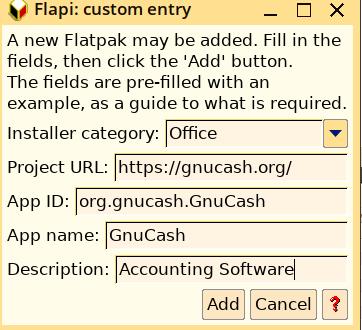
I added Gnucash in Flapi by clicking on Customize button.


 and clicked on Add. It opened GnuCash page on flathub and asked me to confirm that it was the right application. After confirmation it downloaded the flatpak package and installed it.

Here is the default Desktop of Easy OS


Monday, March 20, 2023

What I discovered about calls from 5G phone.

 As written in previous post I upgraded to 5G phone. As per Welcome offer I am getting unlimited 5G data from Jio.

When 5G network is available (it is available most of the time in my area) there is 5G icon on top panel.

When I call someone or there is incoming call the 5G icon vanishes and the call goes over 4G LTE network.

After searching on net for this issue I discovered that my phone is not having VoNR or Vo5G calling feature. You can read about what is VoNR or Vo5G on the following website:

What is Vo5G or VoNR? Everything you need to know

Vo5g is available on Jio since it is SA (Standalone) network but Airtel has no plans to launch SA network.

I conclude that 5G has arrived in India only for data and calling will take place on 4G LTE network even on so called 5G phones.

Thursday, March 16, 2023

I bought 5G Phone.

Since the launch of 5G networks by Airtel and Jio last year I was looking to upgrade my 4G phone to 5G.
I bought Samsung Galaxy M13 5G model which was delivered today on 16 March 2023. I exchanged my POCO C3 phone.
My service provider is Jio. After updating the Operating system Jio network detected that it was 5G phone and sent invite of Welcome offer.
Initial setup of the new phone was done on WiFi network. I installed MyJio app and logged in and saw the Welcome offer. Jio asked me to switch to mobile data and I could see the 5G icon on top panel.
I checked the network speed and found 180 Mbps speed.
I made couple of phone calls and voice was very clear.
Enjoying the free 5G network.

Saturday, February 18, 2023

Endless OS 5.0.0 Gnome 41.3 on Wayland

 I have switched to Endless OS for last six months. Today I updated to latest version Endless OS 5.0.0


There are new features:

Multiple Workspaces

Swipe left/right with three fingers to switch between workspaces

Two finger scrolling.


Tuesday, May 10, 2022

Remove snap packages including Firefox on Ubuntu 22.04, install gnome-software, add Flatpak repo and install Firefox Flatpak version.

Ubuntu 22.04 comes with Ubuntu-Software which is snap store and Firefox comes as a snap package. If you don't like this set up you can remove all installed snap packages including Firefox and install gnome-software with flatpak plugin, add flatpak repo and install Firefox Flatpak version.

$ sudo snap remove --purge firefox
$ sudo snap remove --purge snap-store
$ sudo snap remove --purge gnome-3-38-2004
$ sudo snap remove --purge gtk-common-themes
$ sudo snap remove --purge snapd-desktop-integration
$ sudo snap remove --purge bare
$ sudo snap remove --purge core20
$ sudo snap remove --purge snapd
$ sudo gedit /etc/apt/preferences.d/nosnap.pref
Paste the following:

    # To prevent repository packages from triggering the installation of snap,
    # this file forbids snapd from being installed by APT.

    Package: snapd
    Pin: release a=*
    Pin-Priority: -10

Save and refresh package cache

$ sudo apt update

$ sudo apt install gnome-software
$ sudo apt remove --purge gnome-software-plugin-snap
$ sudo apt install gnome-software-plugin-flatpak
$ flatpak remote-add --if-not-exists flathub https://flathub.org/repo/flathub.flatpakrepo

Restart

Open gnome-software and install Firefox

Monday, May 09, 2022

Remove Firefox snap package on Ubuntu 22.04 and install non snap Firefox also remove snap completely.

 On Ubuntu 22.04 Firefox is a snap package which is slow to open. Here is how to install Firefox and remove the snap package.

Download Firefox from Mozilla.

$ cd Downloads

$ tar xjf firefox-100.0.tar.bz2

$ sudo mkdir /opt

$ sudo mv firefox /opt/firefox100

$ sudo mv /usr/bin/firefox /usr/bin/firefox-snap

$ sudo ln -s /opt/firefox100/firefox /usr/bin/firefox

Now the Launcher on the Desktop will open the Firefox in /opt and not the snap package. Notice the difference in time of opening.

Firefox snap package is still present and we have renamed it as firefox-snap which can be run by typing

$ firefox-snap

You can remove firefox snap package

$ sudo snap remove --purge firefox

But this will remove the Firefox Launcher from the Desktop. To create a new Launcher

Open the File Manager and go to /usr/share/applications

Right Click on firefox.desktop and select Copy

Right Click on Desktop and click paste.

Right click on the Launcher click on Properties/Permissions

Put check mark on Allow executing file as a program.

Again right click on the Launcher and select Allow Launching.

If you want to remove snap completely remove the other installed snap packages one by one

$ sudo snap remove --purge snap-store
$ sudo snap remove --purge gnome-3-38-2004

$ sudo snap remove --purge gtk-common-themes
$ sudo snap remove --purge snapd-desktop-integration
$ sudo snap remove --purge bare

$ sudo snap remove --purge core20

Now only snapd remains to confirm

$ snap list

Finally remove snapd

$ sudo snap remove --purge snapd

To prevent installation of snapd and other snap packages

create a config file

$ sudo gedit /etc/apt/preferences.d/nosnap.pref

Paste the following:

# To prevent repository packages from triggering the installation of snap,
# this file forbids snapd from being installed by APT.

Package: snapd
Pin: release a=*
Pin-Priority: -10

Save and refresh package cache

$ sudo apt update


Wednesday, April 27, 2022

Photo Slideshow on Screensaver on Ubuntu.

 My friend asked me whether he could run Slideshow of Photos on Screensaver. First I thought about Shotwell Photo Manager App. It has Desktop Slideshow option but it did not work on Lock screen.

Then I searched for good old xscreensaver utility and installed it as follows:

$ sudo apt install xscreensaver xscreensaver-gl-extra xscreensaver-data-extra

$ sudo apt remove gnome-screensaver

I added xscreensaver to Startup Applications

Then I opened Screensaver Preferences and selected GLSlideshow in Display Mode

 
 then selected Pictures Folder in Image Manipulation/Choose Random image

 and it works on reboot.

Tuesday, April 19, 2022

Ubuntu 22.04 Jammy Jellyfish Live persistent on usb.

 In the previous post I could run Ubuntu 22.04 Jammy Jellyfish booting iso from grub. Then I made persistent Live usb of Jammy Jellyfish using mkusb. I could boot and run Firefox on first boot. But on reboot Firefox refused to run due to following error:

$ firefox
snap-confine has elevated permissions and it is not confined but should be. Refusing to continue to avoid permission escalation attacks.

This was a show stopper for persistent Live system of Ubuntu 22.04.

On further research I discovered that AppArmor was failing on Live system preventing firefox but how it was running on first boot is still a mystery to me.

Anyway on googling about AppArmor failure on Live System I discovered this page which provides a workaround.

The workaround is as follows:

In Live Persistent mode:
$ sudo mkdir /lib/systemd/system/apparmor.service.d

to create a directory apparmor.service.d in /lib/systemd/system/

sudo gedit /lib/systemd/system/apparmor.service.d/30_live_mode.conf

to create config file in the new directory

Paste
[Unit]
ConditionPathExists=

Save and reboot.

AND Firefox works!

Show must go on for persistent Live system of Ubuntu 22.04.

 Update on 22nd April 2022

This workaround was incorporated in mkusb version 12.7.4 on 21st April 2022 just in time before release of Ubuntu 22.04 Jammy Jellyfish.

Sunday, April 17, 2022

Running Ubuntu 22.04 Jammy Jellyfish booting from ISO.

 I downloaded Ubuntu 22.04 daily live iso a week ago and tried it by inserting following menu entry in /etc/grub.d/40_custom

menuentry "Jammy Jellyfish Desktop iso" {
set isofile="/home/user/jammy-desktop-amd64.iso"
loopback loop (hd0,X)$isofile
linux (loop)/casper/vmlinuz boot=casper iso-scan/filename=$isofile noprompt noeject
initrd (loop)/casper/initrd
}
I could not boot and was getting the error:
Unable to find a medium containing a live file system.

I posted on ubuntuforums and was informed that it was a bug.

The bug has been fixed and the updated iso now boots and I am posting this on Jammy Jellyfish.


Monday, November 15, 2021

POCO C3 Android Phone Factory Reset difficulties.

 I had done Factory reset of my previous Android Phones Coolpad Mega 2.5D and Samsung Galaxy on7 pro without any difficulty. Installation of apps used to take some time (may be an hour or two) but my current phone POCO C3 took several hours even updating preinstalled Google Apps and I could not install essential apps like Paytm, Phonepe, Bigbasket etc.

The main hurdle was updating Google Play Store version 23.10 which I could not do manually. This Play Store version prevented updating preinstalled Google Apps as well as installing other apps.

Actually I should have allowed the phone to update but became restless and tried some tricks like deleting cache and data in Google Play Store and restarting the phone but no result.

Finally all apps updated and I could install other apps and found that Google Play Store was updated to version 27.8.14-21.

Wednesday, October 27, 2021

I made my Fridge Smart.

 Our old frost free fridge was giving problems and we bought a new conventional fridge which requires defrosting atleast twice a week exchanging the old one.

I used to push the defrost button before going to bed twice a week on Sunday and Wednesday.

Recently I bought a smart plug socket which has built in Wifi. As per instructions I installed Smart Life app on the mobile and could connect the Smart Plug to Wifi Network and set it up to stop at midnight and start at 3 AM every day. I could have set it up to work only on Sunday and Wednesday also as being done by manually pushing the defrost button.

I am switching off my Wifi Network before going to sleep in the night and even then the smart plug works because it has built in clock.

Wonderful Gadget!

Automation of entries of shopping in Gnucash on Endless OS with the help of Gemini.

  When I buy something and make payment sms immediately comes on mobile. I enter the transactions in Gnucash on Laptop with Endless OS manua...